

We get this question constantly: do I really need a wedding website? Yes, you do, and here’s why. Without one, you and your bridesmaids will be fielding “wait, what time is the ceremony?” via group text the entire week of the wedding. With a good one, guests stop asking, you stop running a one-woman information desk, and you actually get to enjoy the part where you’re getting married.
When you shop links on our site, we may earn a small commission at no cost to you. Learn more.
Here’s the good news: wedding website builders in 2026 are SO much better than they used to be. The free options are actually free, the templates have finally caught up to what couples want them to look like, and the RSVP tools work without making you want to throw your laptop. The trick is just knowing what features your website needs before you pick a platform, which is exactly what this guide is for. Below: the 8 things every wedding website should have, plus our 5 favorite platforms to build it on.
Wedding Website Cheat Sheet (2026)
The 8 must-haves: address collection, online RSVP with meal selection, matching invitation suite, embedded maps and travel info, multi-registry linking, a small photo gallery, your love story (optional), and a template that actually looks like your wedding. The platforms we recommend in 2026: Joy (our top pick overall, with the smartest guest list and RSVP tools), Zola (best free all-in-one with the strongest registry integration), The Knot (best for big guest lists), Minted (best for high-end matching paper goods), and Basic Invite (best for budget-conscious customization).
The 8 Things Every Wedding Website Needs in 2026
Before you pick a platform, know what features matter most. Some builders are great at design and weak at RSVP management. Others are RSVP-heavy but ugly. The right one for you covers all 8 of these without making you fight the interface.
1. A Clean Address Collection Tool
This might be the most useful feature on any wedding website, and it’s why we recommend never skipping the website step. Instead of texting 80 people for their mailing addresses (and then re-typing all the typos when they send them back), the platform sends each guest a secure link, they fill in their own info, and everything goes into one downloadable list you can hand straight to your invitation calligrapher. We’ve seen brides save themselves entire weekends just by using this tool. Most major platforms have it, but Zola and The Knot have the smoothest flow.
Smart move: Send the address-collection link 6 to 8 months out, alongside the save-the-date. Guests fill it in while they’re already thinking about your wedding, which means it actually gets done instead of sitting in their inbox.
2. Online RSVP with Meal Selection
Online RSVPs are no longer the “modern” choice, they’re just the default in 2026. The right tool will collect yes/no responses, plus-ones, meal selections, and dietary restrictions, plus any custom questions you want to throw in (song requests are our favorite). It also auto-reminds the late RSVPs for you, so you’re not chasing your cousins the week of the wedding. If you’re still on the fence about online vs. paper, we have a longer take in our online RSVP guide.
Pro tip: Always set your RSVP deadline 4 weeks out, not 2. Caterers usually need your final numbers 1 to 2 weeks before the wedding, and that buffer gives you time to chase late RSVPs without panicking.
3. Matching Save-the-Dates and Invitations
We love this feature. Matching your save-the-date, invitation, website, and day-of stationery so they all feel like one wedding instead of four random projects is a small touch your guests don’t consciously register but absolutely respond to. Minted does this really beautifully (their paper-and-website pairings are gorgeous), Zola has hundreds of matched suites to pick from, and The Knot has the largest invitation library if you want a ton of options to scroll through.
4. Embedded Maps and Travel Info
The number of times we’ve seen guests text the bride from outside the wrong venue at 4:55pm is wild. Every wedding website should have an embedded Google Map for each location: ceremony, reception, welcome dinner, after-party, and any recommended hotels. Add a separate “Travel” page if you have out-of-town guests, with airport tips, hotel block info, and parking details. Destination weddings live or die by how good this section is.
Best for: Destination weddings, multi-event weekends, anything where guests need more than one address.
5. Multi-Registry Linking
Most couples are registered at two or three places, and one consolidated registry section on the website saves your guests from calling your mom for the third time asking where you’re registered. Zola has its own registry built in, and their browser button lets guests add literally anything from anywhere on the internet. The Knot has a similar tool. So if you’ve registered at Crate & Barrel, Williams Sonoma, and somewhere niche like Food52, your website pulls all three into one tidy list.
6. A Small Photo Gallery
Our rule of thumb here is 5 to 10 photos, in rough chronological order from “first date era” through engagement. Resist the temptation to upload 47, your guests will scroll through 6 of them, not 60. We love when couples include one early-relationship photo (even if it’s blurry, especially if it’s blurry), one travel photo together, one with both your families, and a few from the engagement shoot. That tells the story without drowning anyone in scroll.
Watch out for: A public photo gallery on a public website means literally anyone can find them. Most platforms let you password-protect the whole site or specific pages, and we always recommend doing that for the photo gallery. Same goes for any pages with home addresses or registry details you’d rather not see in Google results.
7. Your Love Story (Optional, but Guests Love It)
This one’s actually optional, so don’t sweat it if writing a “how we met” paragraph feels forced. Skip it, nobody will notice. But if you can write a good one, guests genuinely love reading these, especially older relatives and family friends who don’t know the whole story yet. Our advice: keep it short (200 to 400 words), include one specific funny detail (the night you got food poisoning on date three, or the proposal that almost happened in a thunderstorm), and don’t try to sound like a Hallmark card.
8. A Template That Actually Looks Like Your Wedding
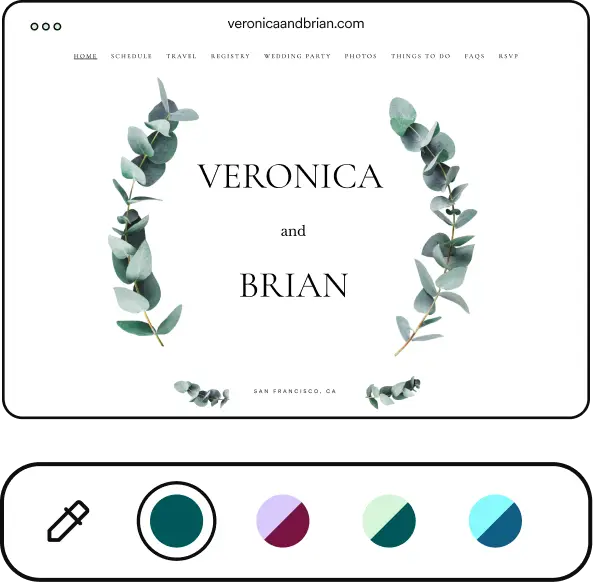
Wedding websites used to look really bad because the templates used to look really bad, and that has fully changed. Every major platform in 2026 has dozens of templates that are genuinely beautiful, in pretty much every wedding style you can think of, from modern minimalist to romantic floral to formal black-tie. Pick the one that matches your save-the-date and invitation, customize the colors and fonts to match your exact wedding palette, and the website will feel like a natural extension of the rest of your stationery instead of a separate, awkwardly-themed thing.
Pro tip: Pick the template before you write the love story or upload your photos. The template’s typography and layout will dictate how much copy fits where, and you don’t want to write 600 words for a section that only displays the first 200.
Where to Build Your Wedding Website (Quick Reference)
Once you know what features you need, the platform decision gets a lot simpler. Here are our 5 favorites for 2026, with each name linking straight to the platform if you want to start building. For the full breakdown of each one (pros, cons, pricing tiers, who they’re for), see our complete Best Wedding Websites review, which also covers Lovebird and WeddingWire.
- Joy — Our top pick overall. Best guest list management and the smartest RSVP and reminder tools we’ve used.
- Zola — Best free all-in-one platform with the strongest registry integration.
- The Knot — Best for big guest lists and couples who want to find their vendors on the same platform.
- Minted — Best for couples who want their website to match high-end paper invitations exactly.
- Basic Invite — Best for budget-conscious couples who want simple customization with 180+ color options.
Want a deeper read on each one? Head over to our Best Wedding Websites Reviewed guide for the full comparison.
When Should You Build Your Wedding Website?
Always build the website before save-the-dates go out, because the save-the-date should include the URL so guests can start using it the second the magnet hits the fridge. For a 12-month engagement, that means a basic version live around 8 months out. The full version (with travel info, RSVP form, photo gallery, and the full event schedule) doesn’t need to be finalized until invitations go out at the 6-to-8-week mark, but the URL itself needs to exist way earlier.
For our full save-the-date timeline, including what to send and when, see our when to send save-the-dates guide.
So, What Actually Matters?
The platform you pick matters way less than what you actually put on the site. We’ve seen gorgeous wedding websites built on Zola, on The Knot, on Minted, on Basic Invite. The websites that actually work are the ones with the full checklist above, plus the URL printed on the save-the-date so your guests can find them.
Our top pick overall is Joy. The guest list management and the smart RSVP reminders are genuinely better than anything else we’ve used. For a totally free all-in-one, Zola is our default recommendation, especially if you also want a strong registry built in. For everyone else, our Best Wedding Websites Reviewed guide goes platform-by-platform, including Lovebird and WeddingWire.
Wedding Website FAQ
Are wedding websites really necessary?
Yes! In 2026, a wedding website is the standard way couples share venue addresses, RSVP forms, registry links, dress codes, and travel info with their guests. Skipping it means fielding 50 individual texts asking “what time is the ceremony again?” the week of the wedding, which is the last thing you want to be doing while you’re trying to actually enjoy your wedding week.
Do guests actually use the wedding website?
Yes, especially for the RSVP form, registry links, hotel info, and venue address. Most platforms show you analytics on which pages guests visit most, and “Travel,” “Registry,” and “RSVP” are consistently at the top of the list. Older guests do still use them less than younger guests, which is why we always recommend keeping the date, time, and primary venue on the printed invitation suite.
Should I include the wedding website on the save-the-date or invitation?
Both. Print the website URL on the save-the-date (this is when guests start using it most), and again on the invitation suite, usually on a small details card. Keep the URL short and easy to type. Most platforms will let you set a custom one like yourwedding.com/jordan-and-sam.
Can I use Squarespace or Wix instead?
You can, but you’ll do a lot more work for fewer wedding-specific features. Squarespace and Wix don’t have built-in RSVP collection, address aggregation, or multi-registry linking, so you’d be bolting on third-party tools or building all the forms manually. Unless you’re a designer with strong opinions about the website itself, we’d say the dedicated wedding platforms (Joy, Zola, The Knot, Minted, Basic Invite) save you a serious amount of time.
Should I password-protect my wedding website?
Yes, we always recommend it! A simple password (something like the wedding date “100426” or your last names) keeps the registry, photo gallery, and any home address details out of public Google search results. Every major platform supports password protection, and you can include the password on your save-the-date or invitation suite next to the URL.
When should I publish my wedding website?
Have a basic version live before save-the-dates go out, typically 6 to 8 months before the wedding. The save-the-date should include the URL. The full version with travel info, full RSVP form, and registry doesn’t need to be finalized until around the 6-week mark, when invitations go out.


